登录后查看更多精彩内容~
您需要 登录 才可以下载或查看,没有帐号?立即注册

x
本帖最后由 dieam 于 2026-3-6 12:35 编辑
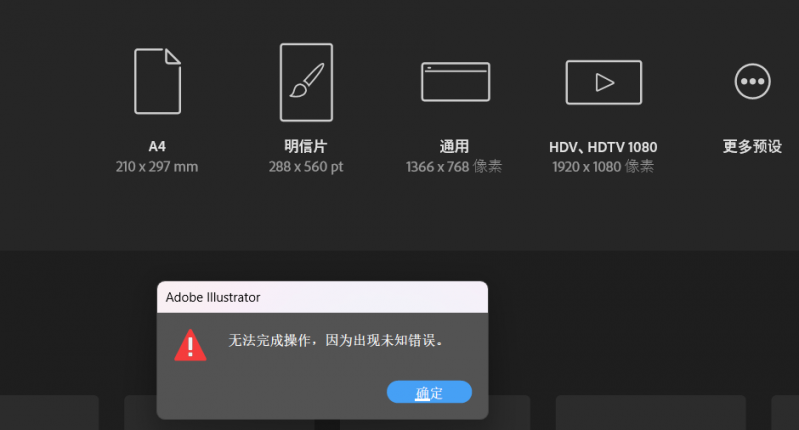
各位大佬,我使用NCL绘图,输出的eps文件在AI中打开时会出现“无法完成操作,因为出现未知错误”的问题,不知道是不是因为绘图设置的问题。
直接通过x11查看以及输出pdf是没有问题的,绘制的内容如图。参考施宁老师书中的代码,绘制中国地图部分以及附加南海小地图。
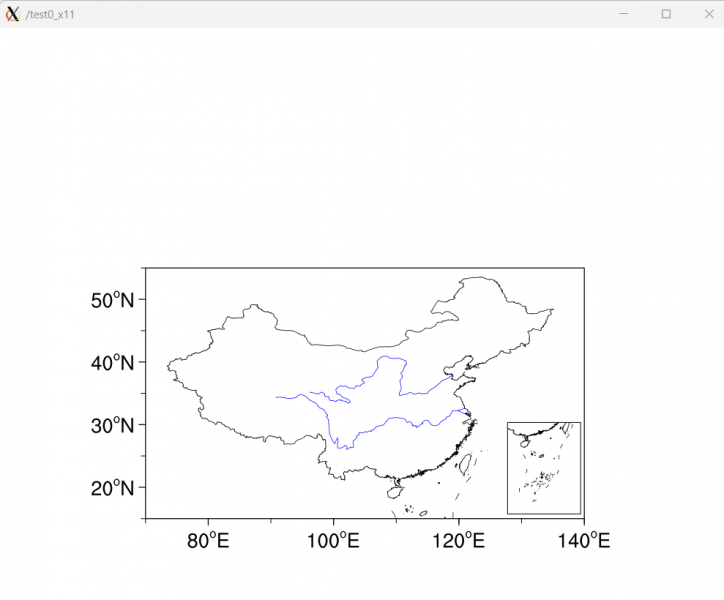
错误如下
pdf文件虽然可以在AI中打开,但不适宜编辑。例如我想直接更改长江黄河粗细,或者更改地图边界粗细时,无法整体选中,相应的部分被分割了成若干小线段。 并且,pdf文件添加到word或者ppt中时,文件会非常大,这是一个很主要的原因。之前通过AI打开eps文件,复制到word中,图片质量高,文件占用空间是很小的。
不知道各位大佬有没有遇到过相关问题,有无解决的方案。
绘图部分代码如下:
- plottype = "eps"
- plotname = outpath + outname
- plotname@wkColorModel = "rgb"
- ; plottype@wkHeight = 2000
- ; plottype@wkWidth = 2000
- wks = gsn_open_wks(plottype, plotname)
- gsn_define_colormap(wks, "NCV_blu_red")
- ;;
- res_map = True
- res_map@gsnDraw = False
- res_map@gsnFrame = False
- res_map@gsnAddCyclic = False
- res_map@vpHeightF = 0.4
- res_map@vpWidthF = 0.6
- res_map@mpDataBaseVersion = "MediumRes" ; Ncarg4_1
- res_map@mpDataSetName = "$NCARG_ROOT/database/Earth..4"
- res_map@mpAreaMaskingOn = True
- ; res_map@mpDataBaseVersion = "Ncarg4_1"
- ; res_map@mpDataSetName = "Earth..4"
-
- res_map@mpLandFillColor = 0
- res_map@mpInlandWaterFillColor = 0
- res_map@mpOceanFillColor = 0
- res_map@mpFillOn = True
- ; res_map@mpFillDrawOrder = "PostDraw"
- res_map@mpMaskAreaSpecifiers = (/"China","Taiwan","Arunachal Pradesh",\
- "Disputed area between India and China"/)
- res_map@mpOutlineOn = False
- res_map@mpOutlineBoundarySets = "Geophysical"
- res_map@mpGeophysicalLineColor = "black"
- ; res_map@mpMaskAreaSpecifiers = (/"China","Taiwan"/)
- ; res_map@mpFillAreaSpecifiers = (/"China","water","land"/)
- ; res_map@mpSpecifiedFillColors = (/"transparent","white","white"/)
- res_map@mpOutlineOn = False
- res_map@mpOutlineSpecifiers = (/"China","Taiwan"/)
- res_map@mpGeophysicalLineThicknessF = 1.
- res_map@mpNationalLineColor = "black"
- res_map@mpNationalLineThicknessF = 1.
- res_nanhai = res_map
- res_map@mpMinLatF = 15
- res_map@mpMaxLatF = maxlat
- res_map@mpMinLonF = minlon
- res_map@mpMaxLonF = maxlon
- ; res_map@mpCenterLonF = 125
- ; res_map@gsnMajorLatSpacing = 10
- ; res_map@gsnMajorLonSpacing = 5
- ; res_map@pmTickMarkDisplayMode = "Always"
- res_map@tmXBValues = ispan(80,140,20)
- res_map@tmXBLabels = (/"80~S~o~N~E","100~S~o~N~E","120~S~o~N~E","140~S~o~N~E"/)
- res_map@tmXBMinorValues = ispan(70,140,10)
-
- res_map@tmYLValues = ispan(20,50,10)
- res_map@tmYLLabels = (/"20~S~o~N~N","30~S~o~N~N","40~S~o~N~N","50~S~o~N~N","55~S~o~N~N"/)
- res_map@tmYLMinorValues = ispan(15,55,10)
- ; res_map@tmYLMinorValues = ispan(20,50,10)
- res_map@tmXTOn = False
- res_map@tmYROn = False
- res_map@tmXBLabelFontHeightF = 0.02
- res_map@tmYLLabelFontHeightF = 0.02
- res_map@tiYAxisString = " "
- res_map@tmXBLabelDeltaF = -0.6
- res_map@tmYLLabelDeltaF = -0.6
- res_map@tmBorderThicknessF = 2.5
- res_map@tmXBMajorThicknessF = 2.5
- res_map@tmYLMajorThicknessF = 2.5
- res_map@tmXBMinorThicknessF = 2.
- res_map@tmYLMinorThicknessF = 2.
- res_map@tmXBMajorLengthF = 0.009
- res_map@tmXBMajorOutwardLengthF = 0.009
- res_map@tmYLMajorLengthF = 0.009
- res_map@tmYLMajorOutwardLengthF = 0.009
- res_map@tmXBMinorOn = True
- res_map@tmYLMinorOn = True
- res_map@tmXBMinorLengthF = 0.006
- res_map@tmXBMinorOutwardLengthF = 0.006
- res_map@tmYLMinorLengthF = 0.006
- res_map@tmYLMinorOutwardLengthF = 0.006
- res_map@cnFillOn = True
- res_map@cnLinesOn = False
- res_map@cnLineColor = "black"
- res_map@cnLineThicknessF = 1.
- res_map@cnLineLabelsOn = False
- res_map@cnInfoLabelOn = False
- res_map@lbLabelBarOn = False
- res_map@pmLabelBarHeightF = 0.05
- res_map@pmLabelBarWidthF = .5
- res_map@lbLabelFontHeightF = 0.018
- res_map@pmLabelBarOrthogonalPosF = 0.205
- res_map@gsnLeftStringFontHeightF = 0.018
- res_map@gsnRightStringFontHeightF = 0.018
- res_map@gsnLeftStringOrthogonalPosF = 0.032
- ;res_map@gsnLeftStringParallelPosF = -.05
- res_map@gsnRightStringOrthogonalPosF = 0.032
- ; res_map@gsnRightStringParallelPosF = 1.16
-
- res_map@gsnLeftString = var_plot&time(i)
- res_map@gsnRightString = ""
- res_map@cnFillOn = True
- res_map@cnRasterSmoothingOn = False
- res_map@cnLinesOn = False
- res_map@cnLineLabelsOn = False
- res_map@cnInfoLabelOn = False
- res_map@cnMonoFillPattern = False
- res_map@cnMonoFillScale = False ;控制点的间隔
- ; res_map@cnFillColors = (/"#818181","#00b0ff"/)
- res_map@cnFillColors = (/"#818181", "#FF69B4", "#58b400"/)
- res_map@cnFillPatterns = (/-1, 5, 5/)
- res_map@cnFillDotSizeF = 0.0045 ;点大小
- res_map@cnFillScales = (/1.0, 1.0, 1.0/) ; 点间距
- res_map@cnLevelSelectionMode = "ExplicitLevels"
- res_map@cnLevels = (/0.5/)
- plot = gsn_csm_contour_map(wks, var2plot, res_map)
- ; plot = gsn_csm_contour_map(wks, var(i,:,:), res_map)
- ; ------------------------------------------------------------------------------------------------------------
- ;;; draw CN map
- shp_path = "/home/zhou/cnmap/cnmap.shp"
- pres = True
- pres@gsLineColor = "black"
- pres@gsLineThicknessF = 1.5
- outline_china = gsn_add_shapefile_polylines(wks, plot, shp_path, pres)
- ;;;
- ; ------------------------------------------------------------------------------------------------------------
- ; ------------------------------------------------------------------------------------------------------------
- ;;; draw nanhai
- xlon = (/130,140,140,130,130/)
- ylat = (/15,15,27.5,27.5,15/)
- reg = True
- reg@gsFillColor = "white"
- gsn_polygon(wks, plot, xlon, ylat, reg)
- ; res_nanhai@vpWidthF = .1
- ; res_nanhai@vpHeightF = .125
- res_nanhai@vpXF = 0.695
- res_nanhai@vpYF = 0.46
- res_nanhai@vpWidthF = .1
- res_nanhai@vpHeightF = .125
- res_nanhai@mpMinLatF = 0
- res_nanhai@mpMaxLatF = 25
- res_nanhai@mpMinLonF = 105
- res_nanhai@mpMaxLonF = 125
- res_nanhai@mpOutline = False
- res_nanhai@tmXBLabelsOn = False
- res_nanhai@tmXTLabelsOn = False
- res_nanhai@tmYLLabelsOn = False
- res_nanhai@tmYRLabelsOn = False
- res_nanhai@tmXBOn = False
- res_nanhai@tmXTOn = False
- res_nanhai@tmYLOn = False
- res_nanhai@tmYROn = False
- res_nanhai@gsnLeftString := ""
- res_nanhai@gsnRightString := ""
- res_nanhai@cnFillOn = True
- res_nanhai@cnRasterSmoothingOn = False
- res_nanhai@cnLinesOn = False
- res_nanhai@cnLineLabelsOn = False
- res_nanhai@cnInfoLabelOn = False
- res_nanhai@lbLabelBarOn = False
- res_nanhai@cnMonoFillPattern = False
- res_nanhai@cnMonoFillScale = False ;控制点的间隔
- res_nanhai@cnFillColors = res_map@cnFillColors
- res_nanhai@cnFillPatterns = res_map@cnFillPatterns
- res_nanhai@cnFillDotSizeF = res_map@cnFillDotSizeF
- res_nanhai@cnFillScales = res_map@cnFillScales
- ; res_nanhai@cnLevelSelectionMode = "ExplicitLevels"
- ; res_nanhai@cnLevels = (/0.5/)
- res_nanhai@cnLevelSelectionMode = "ExplicitLevels"
- res_nanhai@cnLevels = res_map@cnLevels
- map_nanhai = gsn_csm_contour_map(wks, var2plot, res_nanhai)
- res_nanhai@gsLineColor = "black"
- res_nanhai@gsLineThicknessF = 1.5
- plotnh = gsn_add_shapefile_polylines(plot, map_nanhai, shp_path, res_nanhai)
- ; ------------------------------------------------------------------------------------------------------------
- ; ------------------------------------------------------------------------------------------------------------
- ;;; plot rivers
- river_path = "/home/zhou/cnmap_NetCDF/river.nc"
- river = True
- river@gsLineThicknessF = 1.5
- river@gsLineColor = "blue"
- plotrv = gsn_add_shapefile_polylines(wks, plot, river_path, river)
- ; ------------------------------------------------------------------------------------------------------------
- draw(plot)
- draw(map_nanhai)
- frame(wks)
|




 窥视卡
窥视卡 雷达卡
雷达卡 发表于
发表于  提升卡
提升卡 置顶卡
置顶卡 沉默卡
沉默卡 喧嚣卡
喧嚣卡 变色卡
变色卡 抢沙发
抢沙发 千斤顶
千斤顶 显身卡
显身卡